


Product Videos


Microsoft 365, supercharged with Copilot — Your AI companion
Make more empowered decisions, kickstart projects, and accomplish your goals like never before.
Turn prompts into possibilities with Copilot in Microsoft 365
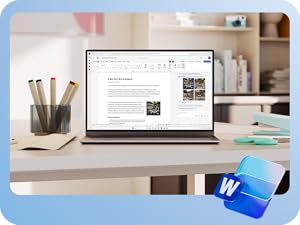
Faster outlines. Better edits.
Use Copilot directly in your Word app to help overcome writer's block and share your thoughts and ideas with confidence.

Spreadsheets, simplified
Copilot[2] recommends formulas, creates charts, and helps you see the story in your data.

From ideas to slides in a snap
With a simple prompt, Copilot in PowerPoint can create slides, generate visuals, and even add speaker notes.

Breeze through your inbox
Use Copilot to summarize long email chains[3] and help you draft and rewrite emails.
-

Design and edit with Al
Create, design, and edit where and when you need it with Microsoft Designer and the power of generative Al [1]. Make eye-catching images using only your words and craft next-level designs that pop.
-

Be more productive
No matter where the day takes you, seamlessly stay on track with powerful productivity apps and Copilot[1] in Microsoft 365. Easily draft documents and emails[3], summarize, analyze data, and more.
-

Microsoft 365 works across your devices
Whether you're at your desk, on the go, or working from home, Microsoft 365 ensures your documents, emails, and apps are always up-to-date and accessible across all your devices.
Disclaimer
Screens simulated. Features and app availability may vary by region.
[1] Al features only available to subscription owner and cannot be shared; usage limits apply.
Learn more at aka.ms/AAycnfc
App availability varies by device/language. Features vary by platform. Minimum age limits may apply to use of Al features.
Details at aka.ms/AAycfjs
[2] Copilot in Excel requires AutoSave to be enabled, meaning the file must be saved to OneDrive; it doesn't function with unsaved files.
[3] Copilot features in Outlook apply to accounts with @outlook.com, @hotmail.com, @live.com, or @msn.com email addresses.
[4] Microsoft 365 Personal, Family, or Premium subscription required.
Product Videos



Customer reviews
Customers say

Select to learn more
Images in this review
Reviews with images
Todo es más práctico.
Top reviews from the United States
There was a problem filtering reviews. Please reload the page.
- KyleReviewed in the United States on September 19, 2025
5.0 out of 5 stars Reliable, Versatile, and Great Value for Everyday Use
Platform: Digital Download (PC/MAC)Edition: Microsoft 365 Personal (1 User)Subscription Term Name: 12 Month SubscriptionVerified Purchase“I’ve been using the Microsoft 365 Personal 12-month subscription for several weeks, and it has significantly improved my productivity. The suite includes all the essential Office apps—Word, Excel, PowerPoint, and Outlook—running smoothly on both my PC and tablet.
Installation was straightforward, and cloud storage via OneDrive makes it easy to access and share files from anywhere. The subscription model ensures I always have the latest updates and security features. Overall, Microsoft 365 Personal is a reliable, versatile, and valuable tool for students, professionals, or anyone who relies on Office apps daily.
6 people found this helpfulReportHelpful - Lori MeadsReviewed in the United States on March 3, 2026
5.0 out of 5 stars Handy
Platform: Digital Download (PC/MAC)Edition: Microsoft 365 Personal (1 User)Subscription Term Name: 12 Month SubscriptionVerified PurchaseGood
ReportHelpful - JonnyReviewed in the United States on January 15, 2026
5.0 out of 5 stars Perfect for Everyday Tasks
Platform: Digital Download (PC/MAC)Edition: Microsoft 365 Personal (1 User)Subscription Term Name: 12 Month SubscriptionVerified PurchaseI use Microsoft 365 for budgeting, documents, presentations, and file storage. Everything syncs easily across devices, and the interface is familiar and easy to use. This subscription is perfect for anyone who needs professional tools at home without complications.
2 people found this helpfulReportHelpful - AnnaReviewed in the United States on January 23, 2026
1.0 out of 5 stars it's complete extortion
Platform: Digital Download (PC/MAC)Edition: Microsoft 365 Personal (1 User)Subscription Term Name: 12 Month SubscriptionVerified PurchaseThe item completely sucks because we are not allowed to PURCHASE it anymore, but must rent it FOREVER, paying and paying and paying and paying and paying. I despise Microsoft for developing this "subscription" model, which means we can NEVER EVER EVER be finished paying them until we're DEAD. I used to OWN the entire Microsoft suite, and there was NOTHING WRONG WITH IT. I didn't need any updates EVER. I don't want any g-d AI integrated into it. I just want the old suite that I OWNED after paying several hundred dollars for it.
19 people found this helpfulReportHelpful - ODTReviewed in the United States on June 22, 2021
4.0 out of 5 stars Easy to purchase, not immediately clear how to set up
Platform: Digital Download (PC/MAC)Edition: Microsoft 365 Personal (1 User)Subscription Term Name: 12 Month SubscriptionVerified PurchaseFirst, I want to point out that Microsoft Office itself works great on my MacBook Air and I love it. Would have been a five star review if the download instructions were more clear. I purchased this download via Amazon versus Microsoft because it was slightly less expensive for the annual sub. I did not know that this would be the primary cause of my headache. Amazon does not have clear instructions listed for this product, if they do I could not find it anywhere. Once purchased you have to assign the license over to yourself. Under manage licenses it gives you two options, one to enter an email to assign the license to or it says assign to me. I entered the email address associated with my Microsoft 365 account, which sends an invitation from Amazon with "download instructions". The email says to simply click on the link to redeem the code and sign into your Amazon account. Suffice to say, this did not work for me. I made several attempts before I had to contact customer support. I spoke with 4 people who could not identify
a resolution before I was transferred to a young man who helped me out pretty quickly. All I had to do was select assign to me and I was sent the same invitation email to the email address that I have associated with my Amazon account. This time when I clicked on the link it took me to the Amazon sign on page and once signed in it took me to the same manage licenses screen. At the top of the screen there was now a button that I could press that allowed me to access license and it prompted an installer so I could download the Microsoft 365 apps to my MacBook successfully. Simple solution thankfully. Also, I am not sure how the assign to me feature works if the email address that you have on file with Amazon is not the same as the email address that you have with Microsoft 365, luckily for me both email addresses were the same. Amazon should have download information clearly listed under the product description to avoid customer frustration and Microsoft should also make sure that sellers of their product have all of the correct information. The purchase was definitely worth it though.
67 people found this helpfulReportHelpful - Amazon CustomerReviewed in the United States on February 7, 2026
5.0 out of 5 stars works once you get it uploaded.
Platform: Digital Download (PC/MAC)Edition: Microsoft 365 Personal (1 User)Subscription Term Name: 12 Month SubscriptionVerified PurchaseCould have used clearer instructions.
One person found this helpfulReportHelpful - ????customerReviewed in the United States on December 1, 2025
5.0 out of 5 stars Love Excel
Platform: Digital Download (PC/MAC)Edition: Microsoft 365 Personal (1 User)Subscription Term Name: 12 Month SubscriptionVerified PurchaseI decided to take advantage of the Cyber Monday discount and upgrade from Office Home 2024 to 365 Personal. I use Excel a lot and needed the newer functions and features which are only available in the 365 version. 365 looks and works just like Office Home 2024 (except 365 has a few more features).
For the install on my Windows 11 PC, I first uninstalled Office Home 2024, then I installed 365 directly from my Microsoft account. At first it looked like I was still on Office Home 2024, but once I signed into Excel, everything properly upgraded.
4 people found this helpfulReportHelpful - LillianReviewed in the United States on January 14, 2026
5.0 out of 5 stars how its works?
Platform: Digital Download (PC/MAC)Edition: Microsoft 365 Personal (1 User)Subscription Term Name: 12 Month SubscriptionVerified PurchaseI still download it. I know is excellent product but maybe is my inexperience. Need help
ReportHelpful


- Careers
- Amazon Newsletter
- About Amazon
- Accessibility
- Sustainability
- Press Center
- Investor Relations
- Amazon Devices
- Amazon Science
- Sell on Amazon
- Sell apps on Amazon
- Supply to Amazon
- Protect & Build Your Brand
- Become an Affiliate
- Become a Delivery Driver
- Start a Package Delivery Business
- Advertise Your Products
- Self-Publish with Us
- Become an Amazon Hub Partner
- See More Ways to Make Money
- Amazon Visa
- Amazon Store Card
- Amazon Secured Card
- Amazon Business Card
- Shop with Points
- Credit Card Marketplace
- Reload Your Balance
- Gift Cards
- Amazon Currency Converter
- Your Account
- Your Orders
- Shipping Rates & Policies
- Amazon Prime
- Returns & Replacements
- Manage Your Content and Devices
- Recalls and Product Safety Alerts
- Registry & Gift List
- Help
- Conditions of Use
- Privacy Notice
- Consumer Health Data Privacy Disclosure
- Your Ads Privacy Choices
