

Product Videos


Similar brands on Amazon


What's in the box
Top Brand: Acer
Similar brands on Amazon
 Shop the Store on Amazon ›
- Shop the Store on Amazon ›

- Shop the Store on Amazon ›

- Shop the Store on Amazon ›

- Shop the Store on Amazon ›

Customer reviews
Images in this review
Reviews with images
A good little Chromebook with some nifty features.
Top reviews from the United States
- Amazon customer5 out of 5 stars
A good little Chromebook with some nifty features.
Reviewed in the United States on July 21, 2026Vine Customer Review of Free ProductBrief content visible, double tap to read full content.Full content visible, double tap to read brief content.I’ve been using this Acer Chromebook Spin 314 for a little under a week and I really like it. It’s a little different to the laptops that I've owned, and it took me awhile to get used to it being more of a tablet style notebook, but once I got used to the apps and the way it works, I found it very useful for browsing the web playing games and creating digital art using the stylus that I bought to go with it.
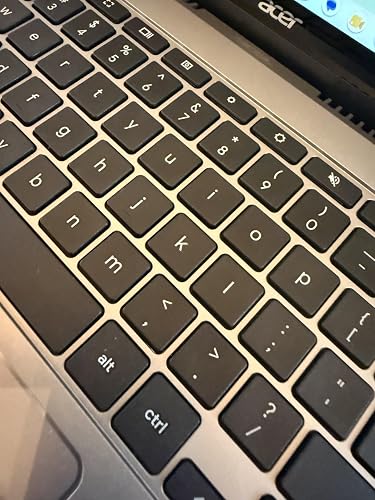
The Chromebook supports AI and Gemini, and I’ve played around a little bit with that, but haven’t gotten too much into it yet. The Intel Core i3 processor and 8GB of memory mean that the Chromebook is fast enough for most tasks required of it. The device is a bit bigger than I expected, coming in at around the same size as my work laptop, but I don’t mind that. The keyboard is responsive, although I would have liked it to be backlit. There are two speakers. One on each side of the keyboard. They actually do a fairly decent job with the sound. There are also several ports for easy connection. Two USB-A ports and one USB-C port. I would have preferred at least one more USB-C port, since it also has to be used to charge the device, so you can’t connect a USB-C cable and charge the Chromebook at the same time. There is also an HDMI port to connect an external monitor, and a headphone jack. There’s also a place to lock the Chromebook with a locking cable, although I’ve personally never had the need to use something like that.
The 14 inch WUXGA screen is thin with a very narrow basil for maximum viewing. The touchscreen is easy to use and responsive, and the anti-glare surface works very well. The screen also flips 360° so that you can convert the Chromebook into a true tablet for working in confined spaces like airplanes. When in tablet mode, the apps appear on the screen, and then when you flip the screen back around to the keyboard, it functions more like a regular laptop.
Of course, it is a Chromebook and not a full laptop, so it does have its limitations. I foresee using this more for pleasure them for work since my job requires me to use a machine that can cope with heavy graphics editing. I foresee using this more for pleasure than for work. That said, the Chromebook is a nifty little device that definitely fills a need for those who don’t want or need an expensive powerful laptop or desktop system. You should also bear in mind that this machine uses chrome OS and not Windows, so the experience will feel a little different to anyone who is used to working on a regular laptop.
The construction of this Chromebook feels sturdy. I was a little concerned when I first saw it that the hinges would not hold up given that I’ve had a couple of laptops where the hinges eventually broke through constant opening and closing. But so far it looks like this little machine can handle the wear and tear. Only time will tell if the hinges hold up over the long-term, but I suspect that they will. The body of the Chromebook is sleek and narrow, and it is lighter than my regular laptop, which isn’t surprising, considering that it’s not trying to be a full-blown laptop. I also like the silver coloring of the body. The touchpad is responsive and easy to use, and when paired with a Bluetooth mouse, the machine gains even more versatility.
All in all, a good little Chromebook from a well respected company and definitely affordable at $499.99 at the time of review.


 Amazon customer5 out of 5 stars
A good little Chromebook with some nifty features.
Reviewed in the United States on July 21, 2026Vine Customer Review of Free ProductI’ve been using this Acer Chromebook Spin 314 for a little under a week and I really like it. It’s a little different to the laptops that I've owned, and it took me awhile to get used to it being more of a tablet style notebook, but once I got used to the apps and the way it works, I found it very useful for browsing the web playing games and creating digital art using the stylus that I bought to go with it.
The Chromebook supports AI and Gemini, and I’ve played around a little bit with that, but haven’t gotten too much into it yet. The Intel Core i3 processor and 8GB of memory mean that the Chromebook is fast enough for most tasks required of it. The device is a bit bigger than I expected, coming in at around the same size as my work laptop, but I don’t mind that. The keyboard is responsive, although I would have liked it to be backlit. There are two speakers. One on each side of the keyboard. They actually do a fairly decent job with the sound. There are also several ports for easy connection. Two USB-A ports and one USB-C port. I would have preferred at least one more USB-C port, since it also has to be used to charge the device, so you can’t connect a USB-C cable and charge the Chromebook at the same time. There is also an HDMI port to connect an external monitor, and a headphone jack. There’s also a place to lock the Chromebook with a locking cable, although I’ve personally never had the need to use something like that.
The 14 inch WUXGA screen is thin with a very narrow basil for maximum viewing. The touchscreen is easy to use and responsive, and the anti-glare surface works very well. The screen also flips 360° so that you can convert the Chromebook into a true tablet for working in confined spaces like airplanes. When in tablet mode, the apps appear on the screen, and then when you flip the screen back around to the keyboard, it functions more like a regular laptop.
Of course, it is a Chromebook and not a full laptop, so it does have its limitations. I foresee using this more for pleasure them for work since my job requires me to use a machine that can cope with heavy graphics editing. I foresee using this more for pleasure than for work. That said, the Chromebook is a nifty little device that definitely fills a need for those who don’t want or need an expensive powerful laptop or desktop system. You should also bear in mind that this machine uses chrome OS and not Windows, so the experience will feel a little different to anyone who is used to working on a regular laptop.
The construction of this Chromebook feels sturdy. I was a little concerned when I first saw it that the hinges would not hold up given that I’ve had a couple of laptops where the hinges eventually broke through constant opening and closing. But so far it looks like this little machine can handle the wear and tear. Only time will tell if the hinges hold up over the long-term, but I suspect that they will. The body of the Chromebook is sleek and narrow, and it is lighter than my regular laptop, which isn’t surprising, considering that it’s not trying to be a full-blown laptop. I also like the silver coloring of the body. The touchpad is responsive and easy to use, and when paired with a Bluetooth mouse, the machine gains even more versatility.
All in all, a good little Chromebook from a well respected company and definitely affordable at $499.99 at the time of review.
Sending feedback...Thank you for your feedback.Sorry, we failed to record your vote. Please try againReportSending feedback...Thanks, we'll investigate in the next few days.Sorry, We failed to report this review. Please try again - Amazon Customer5 out of 5 stars
Very impressed with this Chromebook! In-depth review
Reviewed in the United States on July 17, 2026Vine Customer Review of Free ProductBrief content visible, double tap to read full content.Full content visible, double tap to read brief content.This Acer Chromebook turned out to be quite the powerhouse as far as Chromebooks go; it has overall proven to be a very capable machine, and, as an educator who has come into contact with many different types of Chromebooks, the best one I’ve ever seen.
Let’s start with the hardware: the entire device is on the heavier side and feels a lot more like an actual laptop than just a Chromebook. The mouse pad is large and responsive. The keyboard is serviceable, though the actual keys feel a bit on the cheaper side, perhaps the one downside altogether in the hardware. The keys are quite responsive though, and altogether are not very difficult to type on (I’m actually typing this review on the device right now). There are two speakers in the device, one on either side of the keyboard, that points upwards and has a half-way decent enough volume and sound quality, though headphones will be the much better option for anyone remotely serious about sound. Luckily, there is a headphone jack that worked perfectly well when I tried it out, and my bluetooth earbuds were very easy to connect. There are two USB ports (one on either side); I tested out my wireless mouse with its USB receiver plugged in and it worked perfectly well right away. There is also an HDMI port you can use to either set up a second monitor or else connect to a larger TV to use as a makeshift streaming device.
The device itself so far has proven to not get overly hot or loud, and the battery lasts a REALLY long time so far. In fact, as of this moment, I STILL haven’t charged it, despite using it for somewhere between 6-7 hours over the period of a week and only closing the monitor to put it in standby mode when not in use. That use includes internet browsing, streaming, and playing games. The battery is seriously legit.
But possibly the coolest thing about the device is the touchscreen monitor. The display on the monitor is bright and sharp, and quite pleasing to the eye. The entire screen is also a fully functional, very responsive touch screen. The hinges allow the screen to rotate all the way into a tablet device. The screen is also a much smoother, nicer glass than most touch screens I’ve ever experienced; this is due to the antimicrobial Corning Gorilla Glass that they used. I don’t know if it actually works to prevent germs, but I’ve got to guess it should certainly help if you have multiple users touching the screen, like in a public setting.
Along with the device itself, it comes with a full size computer charger and a protective laptop sleeve.
As for how it runs, I found it to be quite an efficient, easy to use device that was incredibly quick and responsive. If you didn’t know, Chromebooks are not for heavy computing use, but instead, make great devices for browsing the internet, shopping online, streaming, writing and sending emails, some light office work (using Google’s apps like Google Docs, Slides, Sheets, etc.), and some lighter gaming. I was impressed and excited when I realized that many of the games I had purchased for my android smart phone some years ago were available to download and run on this device. I tested a few of these pretty big games and so far found that most ran pretty well with very little issues coming up in my testing.
There are some other cool things about how well the device works. When you are streaming, there is a button at the bottom of the task bar that you can click to manage your media and it makes it very easy to then cast it to a nearby TV on the same network. I won’t get into all the cool features, as they are just generally based on how Chrome OS works and not specific to this device. Suffice to say, I am really pleased with the value and quality of this Chromebook.

 Amazon Customer5 out of 5 stars
Very impressed with this Chromebook! In-depth review
Reviewed in the United States on July 17, 2026Vine Customer Review of Free ProductThis Acer Chromebook turned out to be quite the powerhouse as far as Chromebooks go; it has overall proven to be a very capable machine, and, as an educator who has come into contact with many different types of Chromebooks, the best one I’ve ever seen.
Let’s start with the hardware: the entire device is on the heavier side and feels a lot more like an actual laptop than just a Chromebook. The mouse pad is large and responsive. The keyboard is serviceable, though the actual keys feel a bit on the cheaper side, perhaps the one downside altogether in the hardware. The keys are quite responsive though, and altogether are not very difficult to type on (I’m actually typing this review on the device right now). There are two speakers in the device, one on either side of the keyboard, that points upwards and has a half-way decent enough volume and sound quality, though headphones will be the much better option for anyone remotely serious about sound. Luckily, there is a headphone jack that worked perfectly well when I tried it out, and my bluetooth earbuds were very easy to connect. There are two USB ports (one on either side); I tested out my wireless mouse with its USB receiver plugged in and it worked perfectly well right away. There is also an HDMI port you can use to either set up a second monitor or else connect to a larger TV to use as a makeshift streaming device.
The device itself so far has proven to not get overly hot or loud, and the battery lasts a REALLY long time so far. In fact, as of this moment, I STILL haven’t charged it, despite using it for somewhere between 6-7 hours over the period of a week and only closing the monitor to put it in standby mode when not in use. That use includes internet browsing, streaming, and playing games. The battery is seriously legit.
But possibly the coolest thing about the device is the touchscreen monitor. The display on the monitor is bright and sharp, and quite pleasing to the eye. The entire screen is also a fully functional, very responsive touch screen. The hinges allow the screen to rotate all the way into a tablet device. The screen is also a much smoother, nicer glass than most touch screens I’ve ever experienced; this is due to the antimicrobial Corning Gorilla Glass that they used. I don’t know if it actually works to prevent germs, but I’ve got to guess it should certainly help if you have multiple users touching the screen, like in a public setting.
Along with the device itself, it comes with a full size computer charger and a protective laptop sleeve.
As for how it runs, I found it to be quite an efficient, easy to use device that was incredibly quick and responsive. If you didn’t know, Chromebooks are not for heavy computing use, but instead, make great devices for browsing the internet, shopping online, streaming, writing and sending emails, some light office work (using Google’s apps like Google Docs, Slides, Sheets, etc.), and some lighter gaming. I was impressed and excited when I realized that many of the games I had purchased for my android smart phone some years ago were available to download and run on this device. I tested a few of these pretty big games and so far found that most ran pretty well with very little issues coming up in my testing.
There are some other cool things about how well the device works. When you are streaming, there is a button at the bottom of the task bar that you can click to manage your media and it makes it very easy to then cast it to a nearby TV on the same network. I won’t get into all the cool features, as they are just generally based on how Chrome OS works and not specific to this device. Suffice to say, I am really pleased with the value and quality of this Chromebook.
Sending feedback...Thank you for your feedback.Sorry, we failed to record your vote. Please try againReportSending feedback...Thanks, we'll investigate in the next few days.Sorry, We failed to report this review. Please try again - Boomer4 out of 5 stars
One issue on the initial startup.. no issues since then
Reviewed in the United States on July 31, 2026Vine Customer Review of Free ProductBrief content visible, double tap to read full content.Full content visible, double tap to read brief content.I've been using this Chromebook regularly for a while now, and it's honestly impressed me more than I expected.
The performance has been excellent for everyday use. Web browsing, email, streaming, Office web apps, and running multiple tabs all feel quick and responsive. The processor and 8GB of RAM are more than enough for the kinds of tasks most people buy a Chromebook for.
The 14-inch touchscreen looks sharp and bright, and I like that it folds completely into tablet mode. The hinge feels solid and switching between laptop and tablet modes is smooth. The keyboard is comfortable to type on, and the overall build quality feels much more premium than many Chromebooks I've used.
Battery life has also been very good, easily lasting through a normal day of casual use.
The only hiccup I experienced was that an automatic ChromeOS update initially left it stuck at a white screen during boot. Fortunately, after letting the battery drain and restarting it, the update completed successfully and it has been completely reliable ever since. Great device for light/medium computer use!
One person found this helpfulSending feedback...Thank you for your feedback.Sorry, we failed to record your vote. Please try againReportSending feedback...Thanks, we'll investigate in the next few days.Sorry, We failed to report this review. Please try again - GoNDeep115 out of 5 stars
Fast and easy to navigate, my go to at home or on the road!~
Reviewed in the United States on August 3, 2026Vine Customer Review of Free ProductBrief content visible, double tap to read full content.Full content visible, double tap to read brief content.Never in my life did I think I would like an android operating system. Well, that day has come!
I wanted a portable computer for web browsing, email, documents, video calls, and general everyday use without dragging around a large Windows laptop. The Acer Chromebook Spin 314 has been an excellent fit for that purpose.
The 14-inch WUXGA touchscreen is one of its strongest features. Text looks sharp, colors are good, and the matte finish helps reduce glare. The screen also feels sturdy, and the Gorilla Glass adds some reassurance when using it in tablet or tent mode. The touchscreen responds quickly and makes navigating Chrome OS feel natural.
Performance from the Intel Core i3-N305 and 8GB of memory has been better than I expected. I regularly keep multiple browser tabs open while streaming music, working in Google Docs, and checking email, and it continues running smoothly. It is not intended to replace a high-powered gaming or video-editing computer, but for normal productivity it feels quick and responsive.
The convertible design is genuinely useful rather than just a feature that looks good on the box. I use laptop mode for work, tent mode for watching videos, and occasionally tablet mode when reading. The keyboard is comfortable, the trackpad works well, and the full-HD webcam produces a noticeably better image than many inexpensive laptops.
The 128GB of eMMC storage is adequate for a Chromebook because most of my files are cloud-based. Anyone planning to store a huge local media library should understand the limitations, but for Chrome OS it is perfectly reasonable.
Overall, this is a well-rounded Chromebook with a good screen, strong everyday performance, and enough versatility to handle both work and entertainment. It has become my “grab this instead of the heavy laptop” computer.


 GoNDeep115 out of 5 stars
Fast and easy to navigate, my go to at home or on the road!~
Reviewed in the United States on August 3, 2026Vine Customer Review of Free ProductNever in my life did I think I would like an android operating system. Well, that day has come!
I wanted a portable computer for web browsing, email, documents, video calls, and general everyday use without dragging around a large Windows laptop. The Acer Chromebook Spin 314 has been an excellent fit for that purpose.
The 14-inch WUXGA touchscreen is one of its strongest features. Text looks sharp, colors are good, and the matte finish helps reduce glare. The screen also feels sturdy, and the Gorilla Glass adds some reassurance when using it in tablet or tent mode. The touchscreen responds quickly and makes navigating Chrome OS feel natural.
Performance from the Intel Core i3-N305 and 8GB of memory has been better than I expected. I regularly keep multiple browser tabs open while streaming music, working in Google Docs, and checking email, and it continues running smoothly. It is not intended to replace a high-powered gaming or video-editing computer, but for normal productivity it feels quick and responsive.
The convertible design is genuinely useful rather than just a feature that looks good on the box. I use laptop mode for work, tent mode for watching videos, and occasionally tablet mode when reading. The keyboard is comfortable, the trackpad works well, and the full-HD webcam produces a noticeably better image than many inexpensive laptops.
The 128GB of eMMC storage is adequate for a Chromebook because most of my files are cloud-based. Anyone planning to store a huge local media library should understand the limitations, but for Chrome OS it is perfectly reasonable.
Overall, this is a well-rounded Chromebook with a good screen, strong everyday performance, and enough versatility to handle both work and entertainment. It has become my “grab this instead of the heavy laptop” computer.
Sending feedback...Thank you for your feedback.Sorry, we failed to record your vote. Please try againReportSending feedback...Thanks, we'll investigate in the next few days.Sorry, We failed to report this review. Please try again - Clare5 out of 5 stars
Versatile Touchscreen Chromebook with Solid Everyday Performance
Reviewed in the United States on August 21, 2026Vine Customer Review of Free ProductBrief content visible, double tap to read full content.Full content visible, double tap to read brief content.This Chromebook offers a useful balance of performance and portability for everyday tasks such as browsing, streaming, video calls, schoolwork, and general productivity. The Intel Core i3-N305 processor and 8GB of LPDDR5 memory help provide smooth everyday use, while the 14-inch WUXGA IPS touchscreen gives the device a clear, spacious display with the added flexibility of touch controls. The convertible design makes it easy to switch between laptop and tablet-style use, and the Gorilla Glass screen adds practical protection for regular handling. Wi-Fi 6E and the FHD webcam are also useful for modern connectivity and video calls. The slim convertible design has a clean, appealing look and is easy to carry, while Chrome OS keeps everyday use simple and straightforward. For users who mainly work in a browser or use cloud-based apps, the combination of performance, touchscreen versatility, display quality, and portability provides solid value. The 128GB eMMC storage is more limited for large local files, but it is generally sufficient for typical Chromebook use.
Sending feedback...Thank you for your feedback.Sorry, we failed to record your vote. Please try againReportSending feedback...Thanks, we'll investigate in the next few days.Sorry, We failed to report this review. Please try again - enp6s03 out of 5 stars
Pleasantly surprised by snappiness and gorgeous screen - but overpriced and cheap in other ways
Reviewed in the United States on July 31, 2026Vine Customer Review of Free ProductBrief content visible, double tap to read full content.Full content visible, double tap to read brief content.I'll come clean - I was predisposed to not like this chromebook based on the price. $500 for the specs seemed a bit like highway robbery. $300 seems more reasonable, though the computer hardware market is of course completely mad right now.
My initial impressions didn't help. I think this chromebook for the price should look and feel premium. Instead, it feels and looks a bit... cheap. The body is generic gray plastic, and doesn't inspire confidence in its durability. In fact just picking it up with one hand I would wince a bit as it seemed like I could feel it bend under its own weight.
Then I started using it. First, the screen is GORGEOUS. I was not ready for how good it looks. The touchscreen is responsive, performs flawlessly, and the folding-back 'convertible' feature of the laptop is handy when I do use it. The screen is the one part of this Chromebook that truly feels worth the pricetag.
Despite the modest specs, the Chromebook is quite snappy for modest web-browsing; the i3-N305 really feels like it punches above its weight here.
The battery life is also quite excellent.
However, on a $500 laptop the use of eMMC memory over a SSD seems rather inexcusable.
Then there's the goofy things that are the result of it being a chromebook and not a proper laptop... the lack of perfectly normal keys like page up/down, home, end, caps lock, the super/meta/command/windows key, etc. The arrow keys are rather pathetic considering they're the only navigation keys.
Amazingly however I find myself reaching for it for many day-to-day tasks because of how snappy and responsive it is. Ultimately however it feels like this is a computer that cannot decide if it wants to be a high-end budget computer or an entry-level high-end computer... The screen is amazing, and the computer is in many ways a pleasure to use; but the cheap construction, the lack of a proper SSD, the disappointing keyboard all make the $500 price tag seem... unwarranted, to say the least.
2 people found this helpfulSending feedback...Thank you for your feedback.Sorry, we failed to record your vote. Please try againReportSending feedback...Thanks, we'll investigate in the next few days.Sorry, We failed to report this review. Please try again - Kelly5 out of 5 stars
Awesome Laptop!
Reviewed in the United States on July 29, 2026Vine Customer Review of Free ProductBrief content visible, double tap to read full content.Full content visible, double tap to read brief content.This Acer Chromebook Spin 314 has been one of the best orders I have made on Amazon. I am an Apple user…and while this laptop is targeted more for Android users, I still love it! It is touchscreen, comes with a protective sleeve and the screen quality is outstanding! It powers on so fast and it has a great battery life.
Like I mentioned, it is touchscreen and that is the biggest highlight for me…you can turn it upside down and it sort of turns into a 13 inch tablet. I’ve watched movies on it and the screen quality is so good. No lagging and is so fast!
Would I order this again? Absolutely…it’s a quality tablet for less money than the big name brands and it works just as well. I’ve used it every day since I received it and every day it just keeps getting better and better!
Although Acer is not a huge, well known brand, this laptop does not disappoint with quality and the screen is so vibrant! Not to mention the touchscreen ???? I…LOVE…IT!


 Kelly5 out of 5 stars
Awesome Laptop!
Reviewed in the United States on July 29, 2026Vine Customer Review of Free ProductThis Acer Chromebook Spin 314 has been one of the best orders I have made on Amazon. I am an Apple user…and while this laptop is targeted more for Android users, I still love it! It is touchscreen, comes with a protective sleeve and the screen quality is outstanding! It powers on so fast and it has a great battery life.
Like I mentioned, it is touchscreen and that is the biggest highlight for me…you can turn it upside down and it sort of turns into a 13 inch tablet. I’ve watched movies on it and the screen quality is so good. No lagging and is so fast!
Would I order this again? Absolutely…it’s a quality tablet for less money than the big name brands and it works just as well. I’ve used it every day since I received it and every day it just keeps getting better and better!
Although Acer is not a huge, well known brand, this laptop does not disappoint with quality and the screen is so vibrant! Not to mention the touchscreen ???? I…LOVE…IT!
Sending feedback...Thank you for your feedback.Sorry, we failed to record your vote. Please try againReportSending feedback...Thanks, we'll investigate in the next few days.Sorry, We failed to report this review. Please try again - Amazon Customer4 out of 5 stars
Good webcam
Reviewed in the United States on August 3, 2026Vine Customer Review of Free ProductBrief content visible, double tap to read full content.Full content visible, double tap to read brief content.Acer Chromebook Spin 314 CP314-2HN-30V1 Convertible Laptop | Intel Core i3-N305 | 14' WUXGA IPS Corning Gorilla Glass Touch Matte Display | 8GB LPDDR5 | 128GB eMMC | Wi-Fi 6E | FHD Webcam | Chrome OS
Great screen and feels good in your hands. Chrome OS well that's another story. You either love it or hate it. I feel like this is pretty expensive for a kids chromebook. So I am wondering who this is for? I feel like a non student would not want this. I;m sure a student would love it. The specs are pretty good but at this price of $500 I would expect more. I don't use the touch screen but webcam looked pretty good.

 Amazon Customer4 out of 5 stars
Good webcam
Reviewed in the United States on August 3, 2026Vine Customer Review of Free ProductAcer Chromebook Spin 314 CP314-2HN-30V1 Convertible Laptop | Intel Core i3-N305 | 14' WUXGA IPS Corning Gorilla Glass Touch Matte Display | 8GB LPDDR5 | 128GB eMMC | Wi-Fi 6E | FHD Webcam | Chrome OS
Great screen and feels good in your hands. Chrome OS well that's another story. You either love it or hate it. I feel like this is pretty expensive for a kids chromebook. So I am wondering who this is for? I feel like a non student would not want this. I;m sure a student would love it. The specs are pretty good but at this price of $500 I would expect more. I don't use the touch screen but webcam looked pretty good.
One person found this helpfulSending feedback...Thank you for your feedback.Sorry, we failed to record your vote. Please try againReportSending feedback...Thanks, we'll investigate in the next few days.Sorry, We failed to report this review. Please try again


- Careers
- Amazon Newsletter
- About Amazon
- Accessibility
- Sustainability
- Press Center
- Investor Relations
- Amazon Devices
- Amazon Science
- Sell on Amazon
- Sell apps on Amazon
- Supply to Amazon
- Protect & Build Your Brand
- Become an Affiliate
- Become a Delivery Driver
- Start a Package Delivery Business
- Advertise Your Products
- Self-Publish with Us
- Become an Amazon Hub Partner
- See More Ways to Make Money
- Amazon Visa
- Amazon Store Card
- Amazon Secured Card
- Amazon Business Card
- Shop with Points
- Credit Card Marketplace
- Reload Your Balance
- Gift Cards
- Amazon Currency Converter
- Your Account
- Your Orders
- Shipping Rates & Policies
- Amazon Prime
- Returns & Replacements
- Manage Your Content and Devices
- Recalls and Product Safety Alerts
- Registry & Gift List
- Help
- Conditions of Use
- Privacy Notice
- Consumer Health Data Privacy Disclosure
- Your Ads Privacy Choices
